
AI Fashion Product Photos: A Shopify Seller's Guide
Replace expensive photoshoots with AI fashion product photos. Learn the 3-step workflow, 5 prompt templates, and how to solve the model problem.
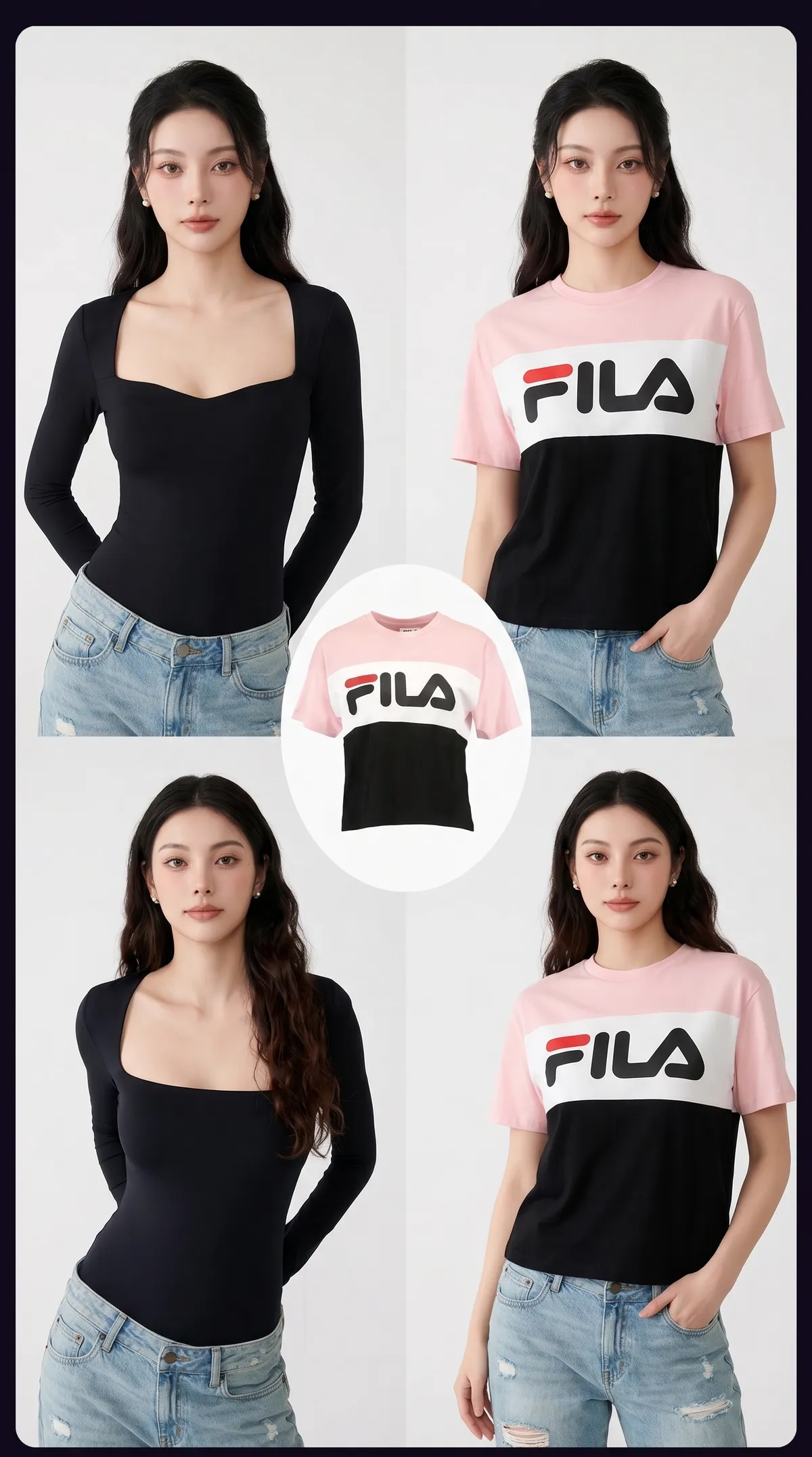
Shopify sellers and fashion affiliates are quietly replacing expensive photoshoots with a laptop, a clean product photo, and a well-written AI prompt. The AI fashion product photos coming out of this workflow rival studio-grade editorials, at the cost of a monthly subscription instead of a day rate. Every small brand and affiliate marketer can now ship imagery that would have needed a model, a photographer, and a studio just eighteen months ago.
TL;DR: Shoot your product cleanly, remove the background, and use AI fashion prompts to drop the garment into any scene, on any model, in any aesthetic. Full workflow, five prompt templates, and the common mistakes to avoid below.
Why Shopify Sellers Are Ditching Traditional Fashion Shoots
Running a fashion store on Shopify used to mean one recurring cost most small sellers quietly hated: the shoot. Hiring a model through an agency, booking a studio for half a day, paying a photographer and a stylist, then editing the results in Lightroom could run $500 to $2,000 per product drop. Scale that across a 30-item collection refreshed every quarter and photography alone eats a junior hire's salary.
For affiliate marketers pushing someone else's inventory, the cost wasn't even on the table. They had to recycle the supplier's catalog photos, the same ones every competing affiliate was also using. Running Facebook ads with imagery that has already been seen ten thousand times is a guaranteed way to watch your CPM climb.
AI fashion product photos changed the economics entirely. A single clean shot of the garment, laid flat on a bedsheet or pinned to a plain wall, becomes the reference. An AI prompt then places that exact product on a generated model, in a generated setting, with studio-grade lighting you would otherwise pay a photographer a full day rate to light. The garment stays yours. The scene, the model, and the mood come from the prompt.
The 3-Step AI Fashion Photo Workflow
Before we get to the prompts themselves, the workflow has to be clean. Skip any step and the AI fills in guesses, which is how you end up with six-fingered hands and texture that looks like the garment was woven from melted plastic.
1. Shoot the product cleanly
Lay the garment flat on a neutral surface, a white bedsheet, a plain wall, or a wooden floor. Use soft natural daylight from a window, never a harsh overhead bulb. Shoot from directly above for flat lays, or straight on for pieces hanging on a hook. The goal is not a beautiful photo. The goal is an HONEST record of the garment's shape, true color, and fabric texture. Save in the highest resolution your phone allows and keep the file untouched, no filters, no auto-enhance.
2. Remove the background
Drop the photo into a background remover. Remove.bg handles most garments in under five seconds, Canva's built-in tool is free inside the editor, and Photoshop's Select Subject has improved enough to handle hair and lace. What you want out the other side is a transparent PNG of only the garment, cut cleanly with no background artifacts. Spend sixty seconds manually fixing cut-off sleeves or jagged edges. Any background residue is treated by the AI as part of the product, which is how you get ghost backdrops bleeding into your final image.
3. Generate the scene with a prompt
Feed the cleaned product into a generator that supports image-to-image or reference-guided generation. Midjourney's --cref and --sref flags, Flux.1's reference inputs, and Stable Diffusion with ControlNet all preserve your product while generating the scene around it. Then drop in the prompt that describes the model, the setting, the lighting, and the mood. This is where ninety percent of the quality comes from, and where most sellers underinvest. The template library in the next section covers the five scenes that work across almost any fashion category.

5 AI Fashion Prompts You Can Steal Today
Each prompt below is a template. Swap the bracketed variables for your product, run it through your AI tool of choice, and iterate once or twice until the output locks in. Save the winners as reusable blocks in your team's library so nobody is rewriting the same template every Monday morning.
1. Outdoor editorial
For hero shots and seasonal campaigns where mood matters more than product clarity. Prompt: "Full-body fashion editorial photograph of a [age range] [ethnicity] model wearing [garment], standing on [setting, e.g. sunlit Parisian street, rooftop at dusk, empty beach at dawn], golden hour lighting, 85mm lens, shallow depth of field, shot on Kodak Portra 400, high-end magazine aesthetic."
2. Studio lookbook
The reliable workhorse for product pages and paid ads. Prompt: "Studio fashion lookbook photo of [garment] on a [model description], neutral gradient backdrop, soft diffused lighting from the left, confident pose, full body, color-graded for a minimalist brand aesthetic, 50mm lens, sharp focus."
3. Lifestyle scene
For ads that need to stop a thumb mid-scroll. Prompt: "Candid lifestyle photograph of [model] wearing [garment] while [activity, e.g. sipping coffee at a sunlit café window, walking a dog through a park, reading on a linen sofa], natural morning light, slight film grain, 35mm lens, editorial color grading."
4. Flat lay with props
For category landing pages and email headers. Prompt: "Overhead flat lay of [garment] styled on a [surface, e.g. linen sheet, marble countertop, weathered oak], surrounded by [props, e.g. vintage jewelry, espresso cup, leather-bound notebook], soft window light from the upper left, curated Pinterest aesthetic, muted earth tones."
5. E-commerce product hero
The clean Shopify PDP shot. Prompt: "Clean product photography of [garment] worn by a [model], pure white seamless backdrop, bright even lighting, front-facing, full body, sharp focus, minimal shadow, e-commerce hero image style."
Save the ones that hit as reusable templates in your TainerAI prompt library so the whole team runs from the same playbook.

How AI Solves the Fashion Model Problem
Finding the right model is the quiet tax on every fashion brand. A small Shopify store can't afford the agency rate for someone who genuinely matches the customer demographic. A London-based brand selling to a US midwest audience is stuck with whatever model happens to be local. Affiliates don't even get the choice, they use whatever supplier photos they were handed.
AI removes that bottleneck entirely. One prompt, one garment, and you can generate the same item on:
- Any body type — straight-size, plus-size, petite, or tall. Your photography can finally reflect the customer who actually buys from you, not a single agency standard.
- Any ethnicity — especially critical if your customer base is diverse and your current catalog does not show it.
- Any age range — twenties through sixties, matched to who actually buys your product.
- Any setting — beach, urban, studio, home office. A context shift alone can double the perceived product value without a single change to the garment itself.
The practical payoff: a twenty-product collection that used to need two models and three shoot days now takes an afternoon. Iteration gets cheap, so you can split-test which model aesthetic actually converts on cold traffic and double down on what works.
The AI Tools You'll Actually Use
You don't need a full AI stack. Most sellers settle on two or three tools total, and the monthly spend lands somewhere between $30 and $80, less than a single hour of studio time.
- Background removal: remove.bg for speed, Canva's built-in remover if you already pay for Canva Pro, or Photoshop's Select Subject when you need frame-perfect cutouts for print-grade imagery.
- AI image generation: Midjourney for photographic realism and film-grain aesthetics, Flux.1 for consistent product preservation across shots, Stable Diffusion with ControlNet for tight structural control, and ChatGPT's image tool for quick drafts and concept tests.
- Upscaling: Topaz Gigapixel or Magnific AI when you need print-ready resolution for paid ads or billboard mock-ups.
- Prompt management: Your team needs one place to store, version, and share prompts so nobody reinvents the template every Monday. Check our AI image prompt category for pre-built fashion templates you can fork today.
Compared to a single traditional shoot, the whole stack pays back in the first week.

Common Mistakes Shopify Sellers Make
The failure modes are almost always the same across every seller who first tries this workflow, and every one of them is avoidable once you know it's coming.
- Skipping the clean product shot. If the input reference is blurry or badly lit, the AI invents details to fill the gap. Spend the ten minutes it takes to shoot a proper reference. It is the single biggest quality lever in the entire workflow.
- Vague prompts. "Fashion model wearing dress, nice background" returns the statistical average of every fashion photo ever uploaded to the internet. Specify lens focal length, lighting direction, pose, setting, mood, and film stock. Every extra detail narrows the output and raises the floor.
- Inconsistent model across a collection. Pick one model aesthetic and lock it across every product in the same drop. Five different models on five products on one page looks like a clearance-aisle mash-up, not a brand.
- Not disclosing AI use when legally required. Some markets, notably the EU under the AI Act, require clear disclosure that imagery is AI-generated. Check your jurisdiction before launching paid campaigns.
- Ignoring hands and faces. Even current top-tier models occasionally fumble hands, ears, and facial symmetry. Zoom in at 100% before you publish anything.
Frequently Asked Questions
Is it legal to use AI-generated models for my Shopify store?
In most jurisdictions, yes. The model does not exist as a real person, so there is no right-of-publicity issue to navigate. EU customers are covered by the AI Act, which may require a visible disclosure that the imagery is AI-generated. Check your local regulations and platform rules. Meta and TikTok both have their own disclosure expectations for paid advertising.
Will customers notice the photos are AI-generated?
If the workflow is sloppy, absolutely. Warped hands, odd texture stretching, and inconsistent lighting between shots are the usual giveaways. With a clean reference photo and a well-crafted prompt, the output is visually indistinguishable from a mid-budget studio shoot to anyone not looking for tells. The product itself remains 100% real, only the model and the scene are synthesized.
Which AI tool is best for fashion product photos?
Midjourney still leads on raw photographic quality, especially for editorial and lifestyle scenes. Flux.1 and Stable Diffusion with ControlNet give tighter control over preserving your actual product's shape and texture. Most sellers run two tools in parallel and pick the better output per shot. See our AI tool directory for current pricing and feature comparisons.
Can I reuse the same AI model across my whole catalog?
Yes, and you should. Midjourney's --cref flag, Flux's reference image input, and Stable Diffusion's IP-Adapter all let you lock a consistent model across every product shot. Pick a model aesthetic early in the collection, save the reference, and reuse it across the entire catalog. Brand consistency beats model variety every time on conversion tests.
How long does this take per product photo?
Once the workflow is tuned, five to ten minutes per product end to end, including a couple of prompt iterations. A fifty-item drop takes one focused afternoon instead of three shoot days and a week of post-production.
Stop Booking Shoots. Start Shipping Photos.
The barrier to professional fashion imagery for Shopify sellers and affiliate marketers just collapsed. A clean product shot, a background remover, and a well-written prompt, that is the entire stack. Affiliates get the same leverage: unique, on-brand photography built from the same supplier catalog every competitor is recycling. Stop waiting for studio availability.
Browse the TainerAI prompt library to grab production-ready fashion prompts and plug them into your workflow this week.